
Turn Claude into a
social media machine
“Deep analyze the top 50 biggest outliers from my niche and breakdown the top performing topics, hooks, formats, and scriptwriting tactics. Visualize in dynamic HTML.”
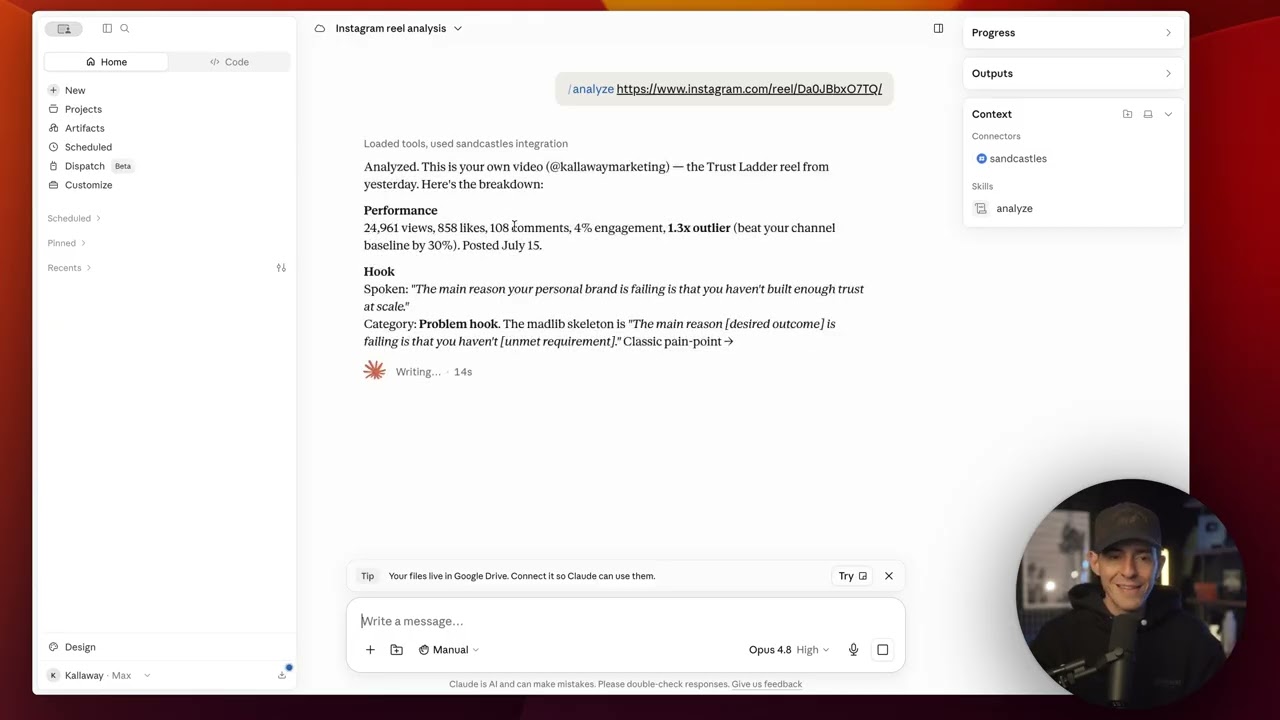
/videos-watchlist/analyze/topic/hooks-watchlist/formats-watchlist- Deep analyze any video and understand why it went viral
- Bulk analyze the top performing outliers from your niche
- Build an AI Content Strategist that finds hidden patterns in your best videos
- Research the hooks, formats, and scriptwriting tactics winning in your niche
- Build an Outlier Detection System that alerts you anytime something goes viral
- Compare your video scripts to other top performers in your niche (find out why yours failed)
Your AI is bad at making content
Get the top outliers
Ask for the best-performing videos across the channels you track, ranked by how far each one beat its own creator's baseline.
Research hooks and formats
Surface the hooks, formats and topics working on your subject right now, and the patterns behind why they land.
Replicate what works
Turn those patterns into a script in the same conversation, so you reproduce what wins instead of guessing.
Setting Up The MCP
- 1STEP 1
Download the MCP Plugin from Sandcastles
- Log into sandcastles.ai.
- Open Settings in the left-hand sidebar of Sandcastles.
- Click Connectors.
- You'll see an API section and an MCP section — you want the MCP one.
- Click Download Plugin vX.X.X and keep the .zip handy.
Log in athttps://www.sandcastles.aiOpenNoteThe MCP is available on Pro, Visionary and Titan. On Starter, upgrade first under Settings → Subscription. - 2STEP 2
Install the plugin in Claude
- Install the Claude desktop app from claude.com/download — the plugin can't be added from the browser chat.
- In the desktop app: Customize → Plugins (bottom-left) → Add (upper right) → Upload Plugin.
- Drag the Sandcastles plugin .zip into the drop area and press Upload.
- Once it loads, press Connectors in the middle of the Plugins page — not Connectors in the bottom-left nav yet — and click Install next to it.
- An Add custom connector window opens with the name and URL already filled in.
- Leave Advanced settings alone. A standard setup needs nothing there.
- Click Add.
Connector URL (pre-filled)https://mcp.sandcastles.ai/NoteThe Add button can look like it did nothing. That's expected — the connector registers in the background. If you try to add it again, Claude will tell you it's already there. - 3STEP 3
Log in with your Sandcastles account
- Click Connectors in the lower-left nav.
- Find Sandcastles (Custom) in the list. The Status column shows a Connect button — click it.
- A browser tab opens asking you to log in to Sandcastles. Enter your credentials to authorize the connection. You only do this once.
- You'll see a Connected message. Close that tab and go back to the desktop app.
How to know it worked: Sandcastles (Custom) now shows a check in the Status column.NoteIf there's one place to get stuck, it's here. When the login tab doesn't appear, it's almost always a pop-up blocker or a corporate Claude account with connectors restricted. - 4STEP 4
Set the tool permissions
- Click your connected Sandcastles connector to see its Tool permissions — these decide what Claude is allowed to do through Sandcastles.
- Pick a setting for each tool. There are four:
- Always allow
- Claude uses the tool without asking.
- Needs approval
- Claude asks you every time.
- Blocked
- Claude can't use the tool at all.
- Custom
- Finer-grained control, rarely needed.
NoteFor the smoothest experience, set all of them to Always allow. - 5STEP 5
Start using it in chat
- Switch to the Home or Code tab. Home → Cowork is the one we'd recommend.
- Ask for what you want in plain language. Claude works out which Sandcastles skills to use on its own.
- For more control, use a / command to call a specific skill directly.
Try asking“Can you give me a list of the top 10 performing videos from my watchlist in the last 7 days? Let me know if there are any that haven't yet been analyzed that we need to analyze.”
Stuck somewhere?
Email support@sandcastles.ai and we'll walk you through it.
Watch a video demo of the MCP installation
Social media skills included
/analyzeDeep-analyze any video and get the breakdown behind its performance.
/channels-addAdd creators to the watchlist you research against, or ask Claude to list or remove them.
/channels-recapCatch up on what a channel has been posting and how it did.
/channels-searchSearch across the channels you're already tracking.
/channels-suggestFind creators worth watching in your niche.
/topicSee which topics are actually working right now.
/formats-watchlistPull the video formats winning across your watchlist.
/hooks-watchlistPull the hooks that are landing across your watchlist.
/video-suggestGet video ideas built from what's overperforming.
/videos-watchlistPull the top-performing videos from your watchlist.
Workflows worth stealing
A full end-to-end content system
The whole thing start to finish — research, ideas, scripts — running as one system in a single chat.
Deep-analyze any channel
Point Claude at a creator and it comes back with a visual report on what's carrying their channel.
Build a video idea pipeline
Auto-detect the best performers in your niche and turn them into a running list of ideas.
Build a hook machine
Write and remix hooks against the ones already proven to work on your subject.
Setup questions
Pro, Visionary and Titan. If you're on Starter you can upgrade under Settings → Subscription and the plugin download appears straight away.
Yes. Plugins can only be installed from the desktop app — you can't add one from the browser-based chat. You can download it at claude.com/download.
That's expected. The window can look like it did nothing while the connector registers in the background. If you try adding it a second time, Claude will tell you it's already there.
This is the most common sticking point. It's usually a pop-up blocker, or a corporate Claude account with custom connectors restricted. Allow pop-ups for Claude and click Connect again.
In Connectors, the Sandcastles (Custom) row shows a check in the Status column. From there, ask Claude for the top videos on your watchlist and it should come back with real data.
No. You authorize the connection once and Claude keeps it. You'd only reconnect if you disconnect it yourself.
Always allow, for all of them. Needs approval works, but Claude will stop and ask you mid-task every time it wants data.
Email support@sandcastles.ai and we'll get you sorted.